React Server Components vs. Client Components: Stop Overusing 'use client'

React Server Components (RSCs) fundamentally changed how we build web applications. By rendering components securely on the server and sending zero JavaScript to the browser, we can achieve flawless Lighthouse scores.
However, the most common mistake I see in codebase audits is developers throwing 'use client' at the top of their page.tsx file the moment they need an onClick handler. Doing this defeats the entire purpose of the Next.js App Router and bloats your bundle size.
The Golden Rule of the App Router
Keep components on the server until they absolutely must be interactive.
You only need 'use client' if your component uses:
useState,useEffect, or custom hooks.- Event listeners (
onClick,onChange). - Browser APIs (
window,document).
The Anti-Pattern: The Massive Client Page
If you make your entire page a Client Component, every imported component inside it also becomes a Client Component. All that JavaScript is shipped to the user.
// ❌ ANTI-PATTERN: Shipping too much JS
'use client';
import HeavyStaticContent from './HeavyStaticContent';
import InteractiveButton from './InteractiveButton';

export default function Page() {
  return (
    <main>
      <h1>Welcome</h1>
      {/* This heavy content didn't need to be sent as JS! */}
      <HeavyStaticContent />
      <InteractiveButton />
    </main>
  );
}
The Solution: Push 'use client' to the Leaves
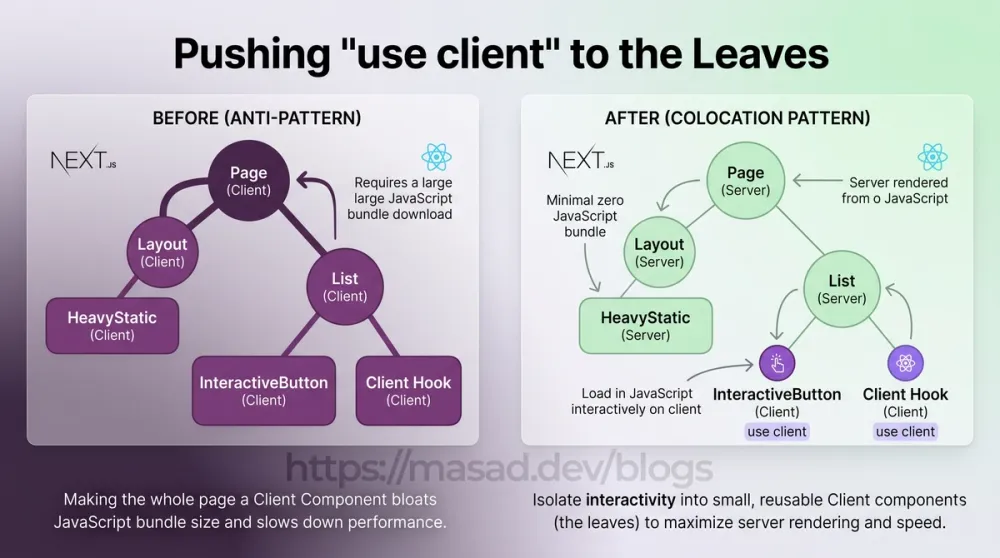
Instead of making the layout a Client Component, isolate the interactivity into the smallest possible component (the "leaves" of your component tree).
// THE RIGHT WAY: InteractiveButton.tsx
'use client';
export default function InteractiveButton() {
  return <button onClick={() => alert('Clicked!')}>Click Me</button>;
}

// THE RIGHT WAY: page.tsx (Server Component)
import HeavyStaticContent from './HeavyStaticContent';
import InteractiveButton from './InteractiveButton';

export default function Page() {
  return (
    <main>
      <h1>Welcome</h1>
      {/* Renders as pure, fast HTML on the server */}
      <HeavyStaticContent />
      {/* Only this tiny button ships JavaScript to the browser */}
      <InteractiveButton />
    </main>
  );
}
The "Hole Punch" Pattern (Passing Server Components as Children)
What if a Client Component needs to wrap a Server Component? (For example, a layout wrapper providing React Context). You can "punch a hole" in the Client Component by passing the Server Component as children.
// ThemeProvider.tsx (Client Component)
'use client';
export default function ThemeProvider({ children }) {
  // Setup context here...
  return <div className="theme-wrapper">{children}</div>;
}

// layout.tsx (Server Component)
import ThemeProvider from './ThemeProvider';
import ServerNav from './ServerNav';

export default function RootLayout({ children }) {
  return (
    <ThemeProvider>
      {/* ServerNav remains a Server Component! */}
      <ServerNav />
      {children}
    </ThemeProvider>
  );
}
Mastering the boundary between Server and Client components is the key to unlocking the true performance potential of modern React.

Need help implementing this?
I partner with founders and technical teams to architect scalable, high-performance solutions.